Conversions Overview
The Conversions section of Reports has 4 available report views, as well as the ability to export the conversion data for your own analysis via the Export Applicant Report button in the left rail navigation.
 Within the Overview view, the elements are as follows:
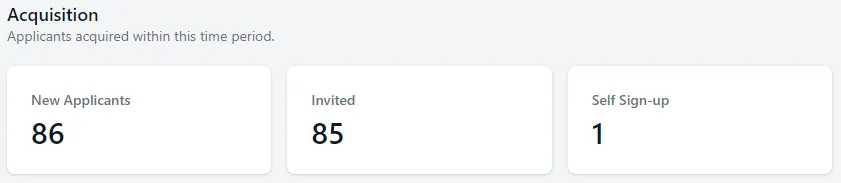
1. Acquisition Key Metrics modules
Section titled “1. Acquisition Key Metrics modules”New Applicants: New applicants to your Approve Owl during the time frame chosen.
Invited: Count of customers invited to your Approve Owl.
Self Sign-up: Count of customers that initiated the Approve Owl process themselves, were not invited by a member of your team.
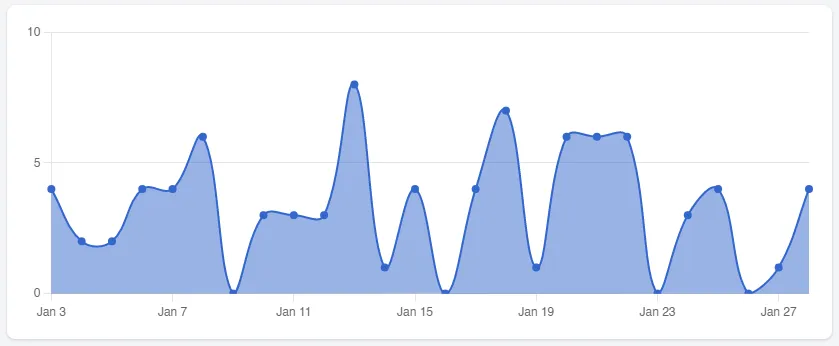
2. New Applicants chart
Section titled “2. New Applicants chart”Visual representation of your new applicants over the time frame chosen in the date range box to the top right of the page.
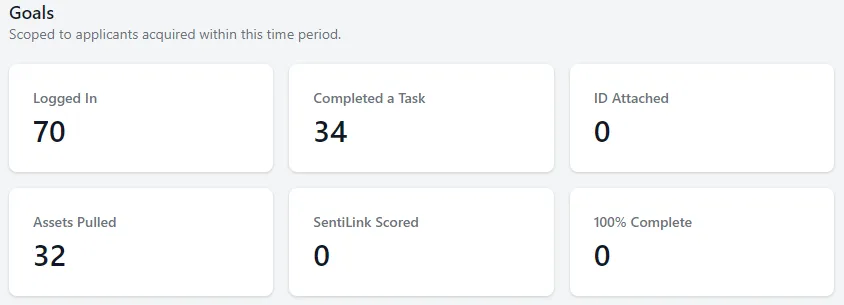
3. Goals key metrics modules
Section titled “3. Goals key metrics modules”Logged In: Count of applicants who logged in to your Approve Owl during the chosen time frame.
Completed a Task: Count of applicants who completed a task.
ID Attached: Count of applicants who uploaded their ID picture to Approve Owl.
Assets Pulled: Count of applicants who their assets (bank data) were pulled.
SentiLink Scored: Count of applicants who were scored by the identity fraud and synthetic identity system.
100% Complete: Count of applicants who completed 100% of the tasks in their applicant profile.