
Dashboard Active Applicants Page
The Active Applicants tab view of the Dashboard lists all active, non-archived, applicants in your Approve Owl platform. You can click on an applicant in the list to navigate to their profile, or click the “New Search” button to the left to locate a specific applicant.
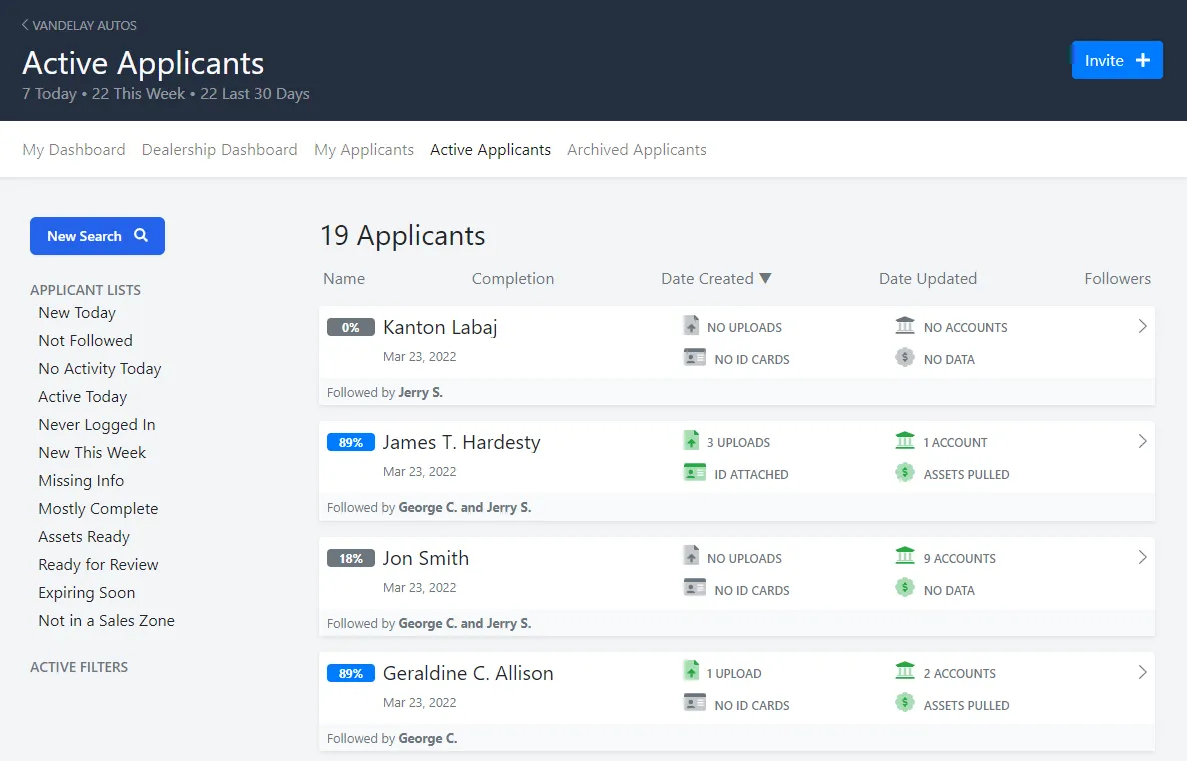
You can also narrow down the list by the stage the applicant(s) is in by clicking on the “Applicant List” options to the left. Each option is filtered as follows:
-
New Today: Applicant profiles created less than 1 day ago.
-
Not Followed: Applicant profiles followed by fewer than 1 users.
-
No Activity Today: Applicants that have not updated their profile today.
-
Active Today: Applicants that have made an update to their profile today.
-
Never Logged In: Applicants that were invited but never logged in to Approve Owl.
-
New This Week: Applicant profiles created less than 7 days ago.
-
Missing Info: Applicant profiles with less than 25% of tasks completed and created less than 31 days ago.
-
Mostly Complete: Applicant profiles with more than 70% of tasks completed and created less than 31 days ago.
-
Assets Ready: Applicant profiles with their bank credentials linked and ready to pull.
-
Ready for Review: Applicant profiles that have assets ready, have uploaded documents for export, and were created less than 31 days ago.
-
Expiring Soon: Applicant profiles that have last signed in more than 50 days ago.
-
Not in a Sales Zone: If your Approve Owl instance uses Sales Zones, this list would contain all applicants not assigned to a Sales Zone.